
Why Gmail Email Opens Are Often Wrong (Gmail Image Proxy Explained)
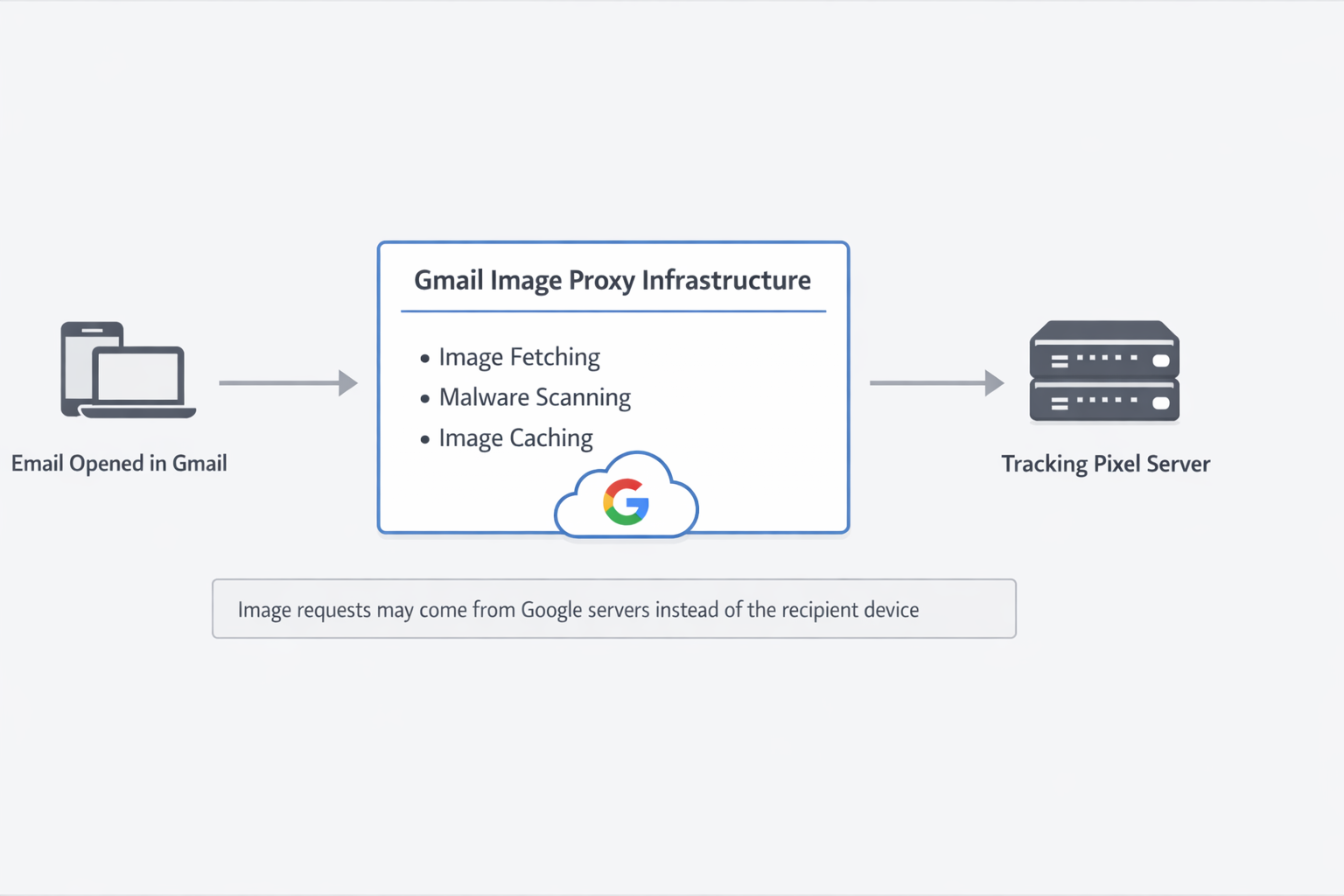
Email tracking systems typically measure engagement by detecting when an invisible image loads inside an email message. When the image is requested from a server, the system records the event as an email open.
However, Gmail does not load images in the same way many other email clients do. Instead, Gmail routes image requests through a system commonly known as the Gmail image proxy. This infrastructure retrieves images on behalf of the user and can make email open tracking appear inaccurate or inconsistent.
This behavior differs from Apple Mail’s Mail Privacy Protection feature, which can preload tracking pixels through privacy relay servers regardless of whether a user actually opens the message. Gmail’s approach is less about masking engagement entirely and more about mediating how images are retrieved through proxy infrastructure. A broader explanation of how Gmail processes images, routing, and engagement signals across its platform can be found in the Gmail Infrastructure Guide.
How Email Open Tracking Works
Most email tracking systems rely on a simple mechanism: a tiny image known as a tracking pixel.
When the email client loads the message and displays images, the tracking pixel is requested from the sender’s server. That request confirms that the message was opened.
For a deeper explanation of the mechanics behind tracking pixels, see How Accurate Is Gmail Email Tracking?.
Gmail’s Image Proxy Layer
Unlike many email clients, Gmail does not load images directly from the sender’s server. Instead, Gmail retrieves images through a proxy system operated by Google.
When Gmail encounters an image inside an email, the request is often routed through Google’s infrastructure before reaching the original image host. The image may also be cached by Google’s systems.
Because of this architecture, image requests sometimes originate from Google servers rather than from the recipient’s device.
A detailed explanation of Gmail’s proxy behavior can be found in How Gmail’s Image Proxy Affects Email Tracking.
Why Tracking Signals Can Look Wrong
Gmail’s proxy architecture introduces several behaviors that can make tracking signals appear misleading.
- Image requests may originate from Google servers instead of the recipient device
- Images may be cached and reused
- Prefetching behavior can load images before a user reads the message
- Multiple image requests can occur under certain conditions
As a result, tracking platforms may report open events that appear earlier than expected or originate from locations associated with Google infrastructure.
This behavior has been confirmed through controlled testing. In the
Email Client Protocol Study – Gmail vs Apple vs Outlook
,
MailPing observed that Gmail generates a proxy-based image request before user interaction, while Apple Mail only loads images at open and Outlook loads images directly from the recipient device. This confirms that Gmail open signals can occur before a user actually opens the email, which is why tracking data often appears incorrect.
However, the issue is not the data itself — it is how that data is interpreted. A deeper explanation of this can be found in
The Email Tracking Problem Isn’t the Data — It’s the Interpretation
,
which breaks down how different email clients generate fundamentally different signal types.
Infrastructure vs User Behavior
It is important to distinguish between infrastructure-level events and real user engagement.
An image request confirms that the email content was rendered somewhere in the delivery chain, but it does not always guarantee that a human viewed the message at that moment.
To address this ambiguity, some tracking systems attempt to classify different types of image requests. MailPing, for example, separates infrastructure-origin requests — such as those generated by Google’s image proxy servers — from recipient-side activity when determining delivery and open events.
This distinction becomes especially relevant when analyzing open rates, engagement signals, or follow-up strategies.
For a broader comparison of tracking approaches, see Best Gmail Email Tracking Methods.
Why Gmail Uses Proxy Infrastructure
Google’s proxy system provides several advantages for users.
- Improved security against malicious image payloads
- Faster image delivery through caching
- Reduced exposure of user IP addresses
- Centralized filtering and scanning
While these benefits improve privacy and performance, they also introduce complexity for systems attempting to interpret image requests as engagement signals. Gmail’s proxy system also hides the recipient’s network identity from senders, a behavior explored in our analysis of which email clients reveal recipient IP addresses.
Understanding the Signals
Email tracking remains widely used across marketing, sales, and customer communication workflows. However, interpreting the signals requires an understanding of how modern email infrastructure operates.
As Gmail continues to dominate global email usage, infrastructure behaviors such as image proxying will play an increasingly important role in how engagement data is interpreted.
Understanding the difference between delivery events, infrastructure events, and real user behavior is essential for anyone relying on email analytics.

MailPing conducts independent analysis of Gmail infrastructure, proxy image retrieval systems, and modern email tracking behavior through controlled testing and research.